Ren'Py MCP + DevTools
A downloadable tool for Windows, macOS, and Linux
RenPy MCP + DevTools — AI-Powered Tools & Visual Dashboard for Ren'Py
Connect your AI assistant (Claude Code, Claude Desktop, etc.) directly to your Ren'Py project. 60 tools that automate the tedious parts of visual novel development, plus a standalone web dashboard that works without AI.
Two ways to use it
| MCP (AI-powered) | DevTools (standalone) |
|---|---|
| 60 tools accessible through natural language | Visual dashboard in your browser |
| Requires Claude Code / Claude Desktop | Just run renpy-webui -p /path/to/game |
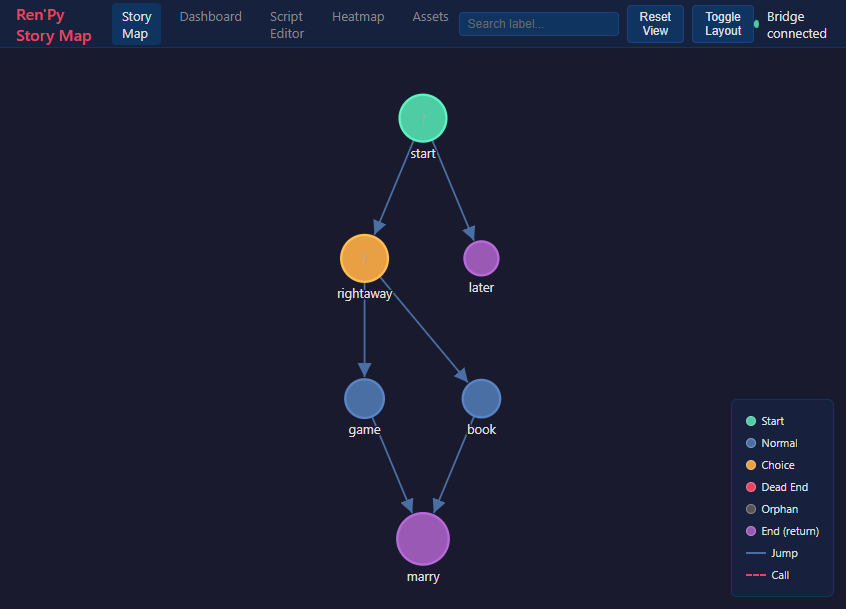
| “Show me the story flow” → generates graph | Interactive story map with click-to-warp |
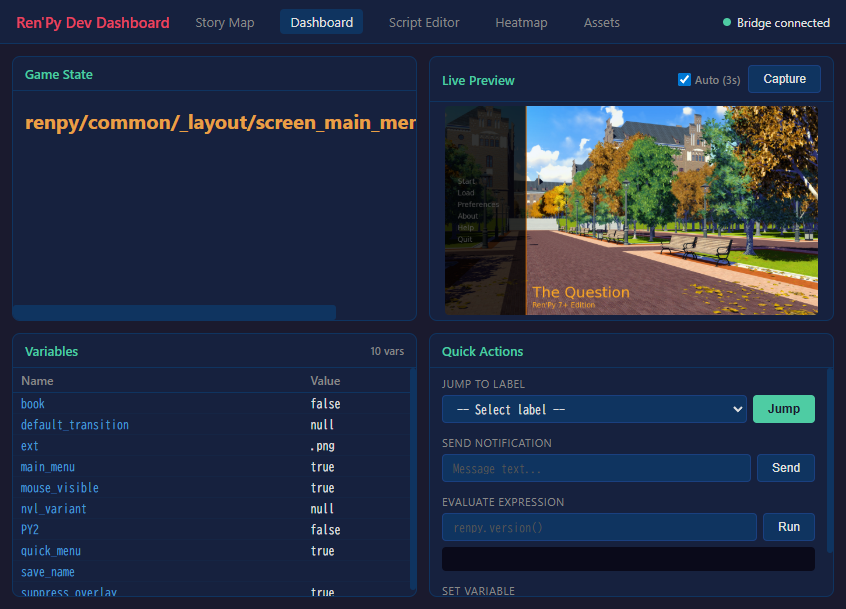
| “What variables are set?” → lists state | Live variable inspector + game preview |
What does it do?
Type a natural language request, and the AI calls the right tools:
- “Show me the story flow graph” → generates a visual map of all labels, choices, and endings
- “Screenshot the scene where Sylvie appears at the library” → searches your script, warps to that line, and captures a real game screenshot
- “How complete are the Japanese translations?” → shows completion % and lists missing strings
- “Rename character 's' to 'sylvie' — dry run first” → previews all 235 changes across every file before applying
Or skip the AI and open the web dashboard directly:
renpy-webui --project /path/to/my-game
Visual DevTools (browser-based)
- Story Map — Interactive graph of all labels and connections. Color-coded by type. Click any node to warp the running game to that scene with correct visual state (backgrounds, sprites, music).
- Dev Dashboard — Real-time game state, live screenshot preview (auto-refreshing), variable inspector, quick actions (jump, eval, notify, set variable).
- Script Editor — Browse and edit .rpy files with syntax highlighting.
- Heatmap — Playtest coverage visualization overlaid on story graph.
- Asset Manager — Browse images/audio with previews, usage tracking, and unused asset detection.
60 Tools in 10 Categories
| Category | Tools | What it does |
|---|---|---|
| Project | 7 | Lint, compile, build, inspect config |
| Preview | 3 | Screenshot any scene, generate galleries |
| Testing | 3 | Run test cases, create tests, reports |
| Analysis | 13 | Story graphs, dead ends, character maps, variable tracking, consistency checks |
| Assets | 4 | List images/audio, find unused assets, verify dimensions |
| Refactoring | 4 | Rename characters/labels, extract routes, insert dialogue |
| Translation | 7 | Completion stats, find untranslated, auto-translate |
| Live Debug | 12 | Eval expressions, inspect styles, jump labels, set variables in running game |
| Web DevTools | 5 | Story map, dashboard, script editor, heatmap, asset manager |
| Docs | 2 | Search 89 official Ren'Py documentation topics |
Before / After
| Without | With RenPy MCP + DevTools |
|---|---|
| Launch game to check each scene | screenshot_scene captures any scene instantly |
| Click through routes to test paths | run_test executes automated test cases |
| Search .rpy files with grep | search_script with regex across all scripts |
| Count translations by hand | list_translations shows completion % per language |
| No way to visualize story structure | Interactive story map with click-to-warp |
| Can't inspect running game state | Live dashboard with variable inspector and game preview |
Requirements
- Ren'Py SDK 8.x — download
- Python 3.11+
- For MCP tools: Claude Code, Claude Desktop, or any MCP client
- For DevTools only: just Python (no AI client needed)
Quick Start
- Download and extract the zip
- Open a terminal in the extracted folder:
cd renpy-mcp uv venv && uv pip install -e . - Option A: AI-powered (MCP) — Add to your
.mcp.json:{ "mcpServers": { "renpy-mcp": { "command": "uv", "args": ["run", "--directory", "/path/to/renpy-mcp", "renpy-mcp"], "env": { "RENPY_SDK_PATH": "/path/to/renpy-sdk" } } } } - Option B: DevTools only — No AI client needed:
Opens the web dashboard in your browser automatically.renpy-webui --project /path/to/my-game
See INSTALL.md in the zip for detailed setup (Claude Desktop, pip, troubleshooting).
Links
Purchase
In order to download this tool you must purchase it at or above the minimum price of $5 USD. You will get access to the following files: